In today’s digital landscape, having a stunning website is just the tip of the iceberg; it’s what lies beneath that truly counts. If you’ve ever wondered why some websites soar to the top of search results while others languish in obscurity, the answer often lies in a powerful, yet often overlooked, combination: SEO and web design. Imagine pouring your heart and soul into a beautifully crafted site, only to have it remain invisible to potential visitors. Frustrating, right? That’s where mastering SEO web design comes into play. By harmonizing aesthetic appeal with strategic search engine optimization, you can create a website that doesn’t just look good but also attracts traffic, engages users, and climbs the rankings. In this article, we’ll explore essential techniques and best practices to transform your website into a search-engine magnet. So, let’s dive in and discover how to marry design with SEO to elevate your online presence!
Understanding the Connection Between SEO and Web Design
When it comes to optimizing your website for search engines, many people overlook how much web design influences SEO performance. A well-structured website not only enhances user experience but also caters to search engine algorithms. Let’s delve into the key aspects that intertwine SEO and web design.
Responsive Design: In today’s mobile-first world, having a responsive design is no longer optional. Search engines, especially Google, prioritize mobile-friendly websites in their rankings. A responsive design ensures that your site looks and functions well across all devices. This adaptability can lead to longer visitor retention, lower bounce rates, and ultimately, improved rankings.
- Improved User Experience: A seamless experience keeps users engaged.
- Faster Load Times: Quick-loading pages are favored by search engines and users alike.
- Higher Conversion Rates: A user-friendly site encourages visitors to take action.
Site Structure and Navigation: The architecture of your website plays a significant role in both SEO and user experience. A logical hierarchy that organizes content effectively helps search engines crawl your site efficiently. Ensure that your navigation is intuitive, enabling users to easily find what they’re looking for. A clear sitemap can further enhance this process.
| Element | SEO Impact | User Impact |
|---|---|---|
| Navigation Menu | Improves crawlability | Enhances usability |
| Internal Links | Distributes page authority | Facilitates content discovery |
| Footer Links | Boosts less-visible pages | Provides additional resources |
Visual Elements: The use of images, videos, and infographics not only makes your content more engaging but can also impact your SEO strategy. Properly optimized images (with alt tags, descriptive filenames, and appropriate sizes) can rank in image searches, driving additional traffic. Moreover, compelling visuals can keep visitors on your site longer, signaling to search engines that your content is valuable.
Ultimately, a harmonious blend of web design and SEO is essential for achieving a successful online presence. By prioritizing user experience and ensuring that your site is search engine-friendly, you’ll create a powerful foundation for boosting your search rankings and enhancing overall engagement.
Creating a User-Friendly Navigation Experience
When it comes to web design, the navigation experience can make or break your site’s usability and, consequently, your SEO performance. A clear, intuitive menu not only helps users find what they need quickly, but it also boosts your search rankings by ensuring that search engines can crawl your site effectively.
Consider the following tips to create a user-friendly navigation experience:
- Prioritize Clarity: Use simple language for menu items. Your visitors should instinctively understand where each link will take them.
- Limit Menu Items: Aim for 5-7 main items to avoid overwhelming users. Too many choices can lead to decision fatigue.
- Use Descriptive Labels: Instead of generic terms like “Products,” consider more specific labels such as “Eco-Friendly Products” to improve keyword relevance.
- Implement Breadcrumbs: This feature allows users to trace their steps back to previous pages, enhancing site navigation and reducing bounce rates.
- Optimize for Mobile: Ensure that your navigation adapts seamlessly to smaller screens, enabling easy access for mobile users.
Incorporating a search bar can also significantly enhance user experience, especially for content-heavy sites. A well-placed search function allows users to quickly find specific information without hunting through multiple pages.
To further illustrate effective navigation strategies, consider the following table of best practices:
| Practice | Description |
|---|---|
| Dropdown Menus | Provides access to subcategories without cluttering the main menu. |
| Sticky Navigation | Keeps the menu visible as users scroll, ensuring easy access to links. |
| Consistent Layout | Keeps navigation elements in the same position throughout the site. |
| Highlight Active Pages | Indicate the current page in the menu to aid orientation. |
Ultimately, a seamless navigation experience not only keeps users engaged but also signals to search engines that your site is well-organized and user-friendly. By prioritizing these design elements, you pave the way for improved SEO and a more satisfied audience.
The Importance of Mobile Responsiveness for SEO
In today’s digital landscape, having a website that adapts to various screen sizes is no longer optional; it’s essential. Mobile responsiveness not only enhances user experience but also plays a critical role in search engine optimization (SEO). Search engines, particularly Google, prioritize mobile-friendly websites in their rankings, understanding that the majority of users now browse the web on their smartphones and tablets.
Why is mobile responsiveness crucial for SEO? Here are a few key reasons:
- Improved User Experience: A responsive design provides a seamless experience across devices, reducing bounce rates and keeping users engaged.
- Higher Search Rankings: Google uses mobile-first indexing, meaning it primarily considers the mobile version of your site when ranking pages.
- Faster Load Times: Mobile-responsive sites are typically optimized for speed, contributing to better performance in search results.
- Increased Click-Through Rates: When users have a positive experience on your site, they are more likely to click through to additional content, improving overall engagement.
Moreover, the importance of mobile responsiveness extends beyond just aesthetics. It affects how search engines crawl and index your content. Websites that do not render well on mobile devices risk being penalized in search rankings, making it imperative for webmasters to ensure their sites are fully optimized for every screen size.
Consider the following table that outlines the differences between responsive and non-responsive websites:
| Feature | Responsive Website | Non-Responsive Website |
|---|---|---|
| Adaptability | Adjusts to any screen size | Fixed layout, requires scrolling |
| Loading Speed | Optimized for fast load times | Often slower on mobile devices |
| User Engagement | Higher engagement and lower bounce rates | Potentially high bounce rates |
To sum it up, embracing mobile responsiveness in your web design strategy is not just about keeping up with trends; it is a fundamental aspect of optimizing your site for search engines and enhancing user satisfaction. As more users access the internet via mobile devices, those who neglect this aspect of web design will likely find themselves falling behind in search rankings, losing potential customers, and ultimately affecting their bottom line.
Optimizing Your Page Speed for Better Rankings
In today’s digital landscape, your website’s speed plays a crucial role in determining not just user experience, but also your search engine rankings. A faster website can lead to higher engagement, lower bounce rates, and improved conversions. To ensure you’re making the most out of your SEO efforts, consider implementing the following strategies to optimize your page speed:
- Optimize Images: Large image files can significantly slow down your site. Use tools like ImageOptim or TinyPNG to compress images without losing quality.
- Minimize HTTP Requests: Each element on your page (images, scripts, stylesheets) requires an HTTP request. Limit these by combining files and using CSS sprites when possible.
- Leverage Browser Caching: By enabling caching, you allow returning visitors to load your site faster. Set an expiration date on your resources to keep them stored in the user’s browser for future visits.
- Use a Content Delivery Network (CDN): CDNs distribute your website’s content across multiple servers worldwide, making it faster for users to access your site no matter their location.
Additionally, you might want to consider the use of lazy loading. This technique defers the loading of non-critical resources (like images) until they are needed. It’s a simple yet effective way to improve initial load times, enhancing user experience significantly.
To give you a clearer picture, here’s a brief comparison of load times before and after implementing these optimizations:
| Optimization Technique | Load Time Before (seconds) | Load Time After (seconds) |
|---|---|---|
| Image Optimization | 5.0 | 3.0 |
| Minimized HTTP Requests | 4.2 | 2.5 |
| Browser Caching | 4.0 | 2.0 |
| CDN Implementation | 3.5 | 1.8 |
Every second counts in the online world. By prioritizing these adjustments, you not only boost your rankings but also create a more enjoyable experience for your visitors. Remember, an optimized website is a crucial element in your SEO strategy, leading to sustained growth in traffic and conversions.

Utilizing Keywords Effectively in Your Web Content
In today’s digital landscape, harnessing the power of keywords is essential for driving traffic to your website. When you strategically embed keywords throughout your content, you enhance your site’s visibility on search engines, making it easier for potential customers to find you. Here are some practical tips to utilize keywords effectively:
- Keyword Research: Start with thorough research to identify the terms and phrases that your target audience is searching for. Tools like Google Keyword Planner and SEMrush can help you discover high-volume, low-competition keywords.
- Placement Matters: Integrate your primary keywords naturally into key areas of your content, such as the title, headers, and meta descriptions. Avoid keyword stuffing; instead, aim for a seamless flow that enhances readability.
- Long-Tail Keywords: Don’t overlook long-tail keywords, which are often less competitive and more targeted. These phrases can help attract a more specific audience, boosting your chances of converting visitors into customers.
- Content Variety: Use a mix of keyword types—primary, secondary, and related keywords. This approach not only aids in SEO but also enriches the content, making it more engaging for readers.
Moreover, consider the context in which your keywords appear. Search engines are smart; they evaluate the relevance and quality of content. Using synonyms and related terms can improve your content’s semantic relevance, making it more appealing to both search engines and users.
To help visualize this strategy, here’s a simple table outlining different types of keywords and their benefits:
| Keyword Type | Description | Benefits |
|---|---|---|
| Primary Keywords | Main focus of your content | High visibility, increased traffic |
| Secondary Keywords | Supportive terms related to primary keywords | Enhances relevance, improves ranking |
| Long-Tail Keywords | Specific phrases often used by niche audiences | Lower competition, higher conversion rates |
Remember, the ultimate goal is to create high-quality content that resonates with your audience while satisfying search engine criteria. When you focus on delivering value and relevance, the strategic use of keywords will naturally follow, leading to improved search rankings and greater visibility for your brand.
Crafting Engaging Meta Tags and Descriptions
Creating meta tags and descriptions is an essential strategy for enhancing your website’s visibility on search engines. These snippets of text are your first chance to make an impression on potential visitors, so it’s crucial to craft them effectively. Here’s how to do it:
- Be Descriptive: Clearly outline the content of your page. Use action-oriented language to draw users in.
- Incorporate Keywords: Use relevant keywords naturally within your meta tags. This not only helps with SEO but also lets users know that your content is what they are searching for.
- Keep It Concise: Aim for about 150-160 characters for descriptions. This ensures that your text won’t be cut off in search results and communicates your message effectively.
Additionally, consider using a call-to-action in your descriptions. Phrases like “Learn more,” “Discover our services,” or “Join us today” can increase the click-through rate as they encourage users to take action. Here’s a simple layout for how to structure your meta tags:
| Element | Example |
|---|---|
| Title Tag | Master SEO Web Design | Boost Your Search Rankings |
| Meta Description | Unlock the secrets of SEO web design to elevate your online presence and attract more visitors to your site. |
test different variations of your meta tags and descriptions. Use A/B testing to see which combinations yield the best results in terms of click-through rates and user engagement. Remember, while crafting these elements, your ultimate goal is to create a compelling narrative that resonates with your audience while staying true to your brand’s voice.

The Role of High-Quality Visuals in SEO Success
In the digital landscape, where attention spans are fleeting, high-quality visuals become not just an optional enhancement but a crucial element of an effective SEO strategy. Incorporating engaging images, infographics, and videos can captivate visitors, encouraging them to stay longer on your site, which positively impacts your search rankings. Google rewards sites that provide a good user experience, and having appealing visuals plays a significant role in that.
When selecting visuals for your website, consider the following factors:
- Relevance: Ensure that your images directly relate to the content they accompany. This relevance not only enhances user engagement but also helps search engines understand your page’s context.
- Quality: Use high-resolution images that are clear and visually appealing. Poor-quality visuals can detract from your site’s professionalism and deter potential visitors.
- Optimization: Always optimize images for faster loading times. Compressed files without sacrificing quality can improve your page speed, a critical ranking factor.
Moreover, don’t overlook the importance of alt text. Alt tags provide descriptive information about images, which not only aids visually impaired users but also offers search engines additional context. This can lead to improved indexing and potentially higher rankings in image search results. Incorporating keywords naturally into your alt text can give your site an extra SEO boost.
| Visual Type | SEO Benefit |
|---|---|
| Images | Enhances user engagement and provides contextual cues for search engines. |
| Infographics | Encourages shares and backlinks, increasing domain authority. |
| Videos | Boosts time spent on site and reduces bounce rates. |
Lastly, remember that visuals should be part of a cohesive strategy rather than isolated elements. By integrating imagery within your overall content plan and ensuring consistency in style and branding, you create a visually appealing narrative that guides users through their journey. As you master the art of SEO web design, let high-quality visuals lead the way to improved search rankings, greater engagement, and ultimately, higher conversion rates.

Implementing Structured Data for Enhanced Visibility
To stand out in the crowded digital landscape, leveraging structured data is essential. This technique allows search engines to understand the content of your website better, presenting it in a more informative way in search results.
By implementing structured data, you can enhance your website’s visibility in various ways:
- Rich Snippets: These enhance your search results with additional information such as star ratings, prices, and availability, making your listing more appealing to users.
- Knowledge Graph: Structured data can help your brand get featured in the Knowledge Graph, providing users with quick answers right on the search results page.
- Improved Click-Through Rates: By providing more context about your content, structured data can lead to higher engagement rates, as users are more likely to click on visually enhanced listings.
Getting started is easier than you think. Here’s a brief overview of the steps you can take:
| Step | Description |
|---|---|
| 1. Choose a Schema Type | Select the type of schema that suits your content, such as articles, products, or events. |
| 2. Implement Markup | Add the structured data markup to your HTML using JSON-LD or Microdata formats. |
| 3. Test Your Data | Use Google’s Structured Data Testing Tool to ensure everything is set up correctly. |
| 4. Monitor Performance | Keep an eye on your search performance and make adjustments as needed. |
Moreover, search engines like Google reward sites that provide clear and concise structured data. This not only helps in achieving a better ranking but also builds trust with users who can see you are providing valuable information upfront. Remember, the more informative and appealing your listings are, the higher the likelihood of attracting clicks and converting visitors.
So, take advantage of structured data to elevate your SEO web design. By doing so, you’re not just optimizing for search engines; you’re also enhancing the user experience, which is ultimately the key to retaining and converting visitors.

Building a Secure Website to Gain Trust and Authority
In today’s digital landscape, a secure website is not just a technical requirement; it’s a crucial element for building trust and authority with your audience. When users visit your site, they are subconsciously evaluating its trustworthiness. A presence of security features not only elevates your site’s credibility but also enhances user engagement, leading to better SEO performance.
Here are key aspects to consider when building a secure website:
- SSL Certificate: Ensure that your site has a valid SSL certificate. This not only encrypts data but also displays a security badge, reassuring users that their information is protected.
- Regular Updates: Keep your website’s software, plugins, and themes updated. Outdated components can be vulnerable to attacks, compromising your site’s integrity.
- Strong Password Policies: Encourage the use of strong passwords and implement two-factor authentication to safeguard user accounts and administrative access.
Moreover, search engines like Google consider site security as a ranking factor. A secure website can improve your search engine rankings by:
- Reducing bounce rates, as users are more likely to stay on sites that they perceive as safe.
- Increasing user trust, leading to higher conversion rates and positive user experiences.
- Enhancing your reputation in the digital space, which can lead to organic backlinks from reputable sources.
| Security Feature | Benefit |
|---|---|
| SSL Certificate | Encrypts data and builds user trust |
| Regular Backups | Ensures data recovery in case of breaches |
| Firewall Protection | Prevents unauthorized access |
By prioritizing website security, you not only protect your assets but also foster a trustworthy relationship with your users. Implementing these strategies can significantly enhance your site’s authority, making it a reliable source in your niche. This trust can translate directly into improved SEO performance, elevating your site’s position in search rankings.
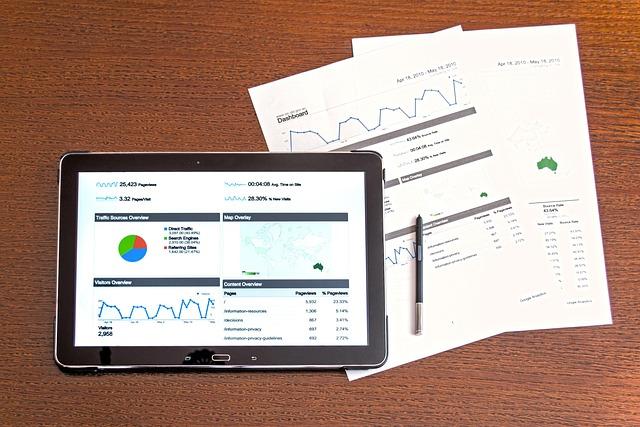
Leveraging Analytics to Continuously Improve Your SEO Strategy
To truly harness the power of SEO, you must embrace a data-driven approach. Analytics allows you to delve into user behavior, uncovering insights that can dramatically enhance your website’s performance. By consistently monitoring metrics such as organic traffic, bounce rates, and conversion rates, you can identify areas for improvement and capitalize on successful strategies.
Start by utilizing tools like Google Analytics and Search Console. These platforms provide a wealth of information about how users interact with your site. Focus on key performance indicators (KPIs) to assess your SEO tactics:
- Organic Traffic: Track the number of visitors arriving through search engines to measure the effectiveness of your keywords.
- Bounce Rate: Analyze the percentage of visitors who leave without interacting; a high bounce rate may indicate content misalignment.
- Conversion Rate: Determine how many visitors complete desired actions, like signing up for a newsletter or making a purchase, to measure the success of your SEO content.
Periodic audits of your site can reveal valuable insights. Conduct A/B testing on different web pages to see which designs or content formats drive higher engagement. Use the results to refine your approach continually. For instance, if a particular blog post garners more traffic than others, analyze its keywords, structure, and visuals to replicate its success across your site.
Consider also employing heat maps and user session recordings to visualize how visitors interact with your website. These tools can highlight areas where users struggle or lose interest, helping you to refine your design and content strategically. For example, if users frequently click on a non-clickable element, it may indicate a need for clearer calls to action or improved navigation.
| Metric | Best Practice |
|---|---|
| Organic Traffic | Optimize keyword usage and improve page load speed. |
| Bounce Rate | Enhance content relevance and ensure mobile responsiveness. |
| Conversion Rate | Implement clear CTAs and user-friendly forms. |
Incorporating these analytics-driven tactics into your SEO strategy not only aids in understanding your audience better but also fosters a culture of continuous improvement. As you adapt based on real data, your site’s rankings will naturally rise, ultimately leading to increased visibility and user engagement.
Frequently Asked Questions (FAQ)
Q&A: Master SEO Web Design to Boost Your Search Rankings
Q1: What is SEO Web Design, and why is it important?
A: SEO Web Design is the art and science of creating websites that are not only visually appealing but also optimized for search engines. It’s vital because it helps your site rank higher in search results, driving organic traffic and enhancing visibility. Think of it as building a store in the busiest part of town—if people can’t find you, they won’t walk through your doors!
Q2: How can I ensure my website is SEO-friendly from the start?
A: Start with a clean and responsive design that adapts to all devices. Use SEO best practices like clean URLs, proper tag structures, and keyword-rich content from the get-go. It’s like laying a solid foundation for a house; the stronger the base, the better the outcome!
Q3: What role do keywords play in SEO Web Design?
A: Keywords are the bridge between your content and what users are searching for. By strategically placing relevant keywords throughout your site—especially in headings, alt texts, and meta descriptions—you’re telling search engines what you’re about. It’s like having a neon sign that says, “Hey, look over here!”
Q4: How do site speed and performance impact SEO?
A: Site speed is crucial; a slow website can frustrate users and lead to high bounce rates, which search engines notice. Aim for fast loading times—ideally under 3 seconds. You wouldn’t want to wait in line for a coffee if there’s a faster option nearby, right? The same principle applies to your website visitors!
Q5: What design elements should I prioritize for better SEO?
A: Focus on a user-friendly navigation structure, mobile optimization, and clear calls-to-action. Use visual elements wisely and don’t clutter your pages. Remember, a well-organized site is like a well-organized closet—easy to navigate and find what you need!
Q6: Can I use social media integration to support my SEO efforts?
A: Absolutely! Integrating social media buttons can increase your content’s reach and encourage sharing, which can lead to more backlinks and traffic. It’s like having a friend recommend your favorite restaurant; it boosts your credibility and attracts more visitors!
Q7: How often should I update my website to maintain SEO rankings?
A: Regular updates are key! Fresh content signals to search engines that your site is active and relevant. Aim to update your blog, add new pages, or refresh existing content at least once a month. Think of it like watering a plant; consistent care leads to vibrant growth!
Q8: What tools can help me with SEO Web Design?
A: There are plenty of tools out there! Google Analytics for tracking performance, SEMrush for keyword research, and Yoast SEO for WordPress optimization are just a few. These tools can guide you on your SEO journey, making the process smoother and more effective.
Q9: Should I hire a professional for SEO Web Design or can I do it myself?
A: It depends on your comfort level and resources. If you’re tech-savvy and eager to learn, you can definitely tackle it yourself! However, hiring a professional can save you time and ensure you’re implementing the latest strategies effectively. Just like you’d hire a mechanic for complex car issues, sometimes it’s worth enlisting an expert!
Q10: What’s the biggest takeaway for someone looking to master SEO Web Design?
A: The most important thing is to think like your audience. Create content that answers their questions, solves their problems, and provides value. If you focus on user experience while implementing SEO best practices, you’ll not only boost your search rankings but also cultivate a loyal audience. It’s a win-win!
The Way Forward
As we wrap up our deep dive into mastering SEO web design, it’s clear that the synergy between aesthetics and functionality is no longer optional—it’s essential. By implementing the strategies we’ve discussed, you’re not just enhancing your website’s visual appeal; you’re paving the way for improved search rankings, better user experience, and ultimately, increased conversions.
Remember, SEO web design is an ongoing journey, not a one-time task. Stay curious, keep experimenting, and don’t be afraid to adapt to the ever-changing landscape of search algorithms and user expectations. Your website is your digital storefront; make it inviting, intuitive, and optimized for search engines.
So, what are you waiting for? Take the insights and techniques you’ve learned today, and start transforming your website into a powerhouse that attracts, engages, and converts. With the right approach, your site can rise through the ranks, bringing your business the visibility it deserves. Happy designing, and may your search rankings soar!